Gender Swap Filter: See Yourself as the Opposite Gender
Upload one photo, choose a direction, and our gender swap filter shows you as a woman or as a man in about 20 seconds. It is the same face and the same photo, with only the sex changed.
Log in with Google · 4 free credits · about 20 seconds
You can also paste an image with Ctrl/⌘+V.
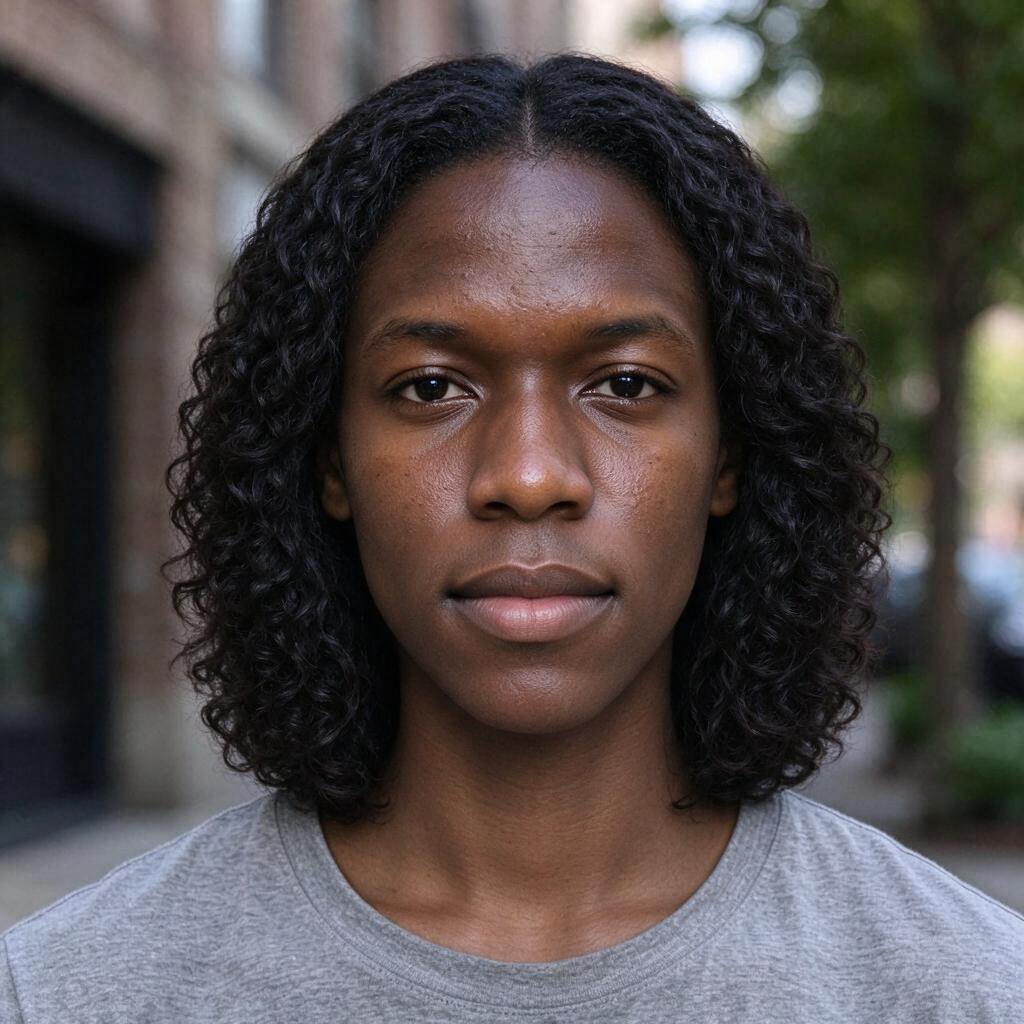
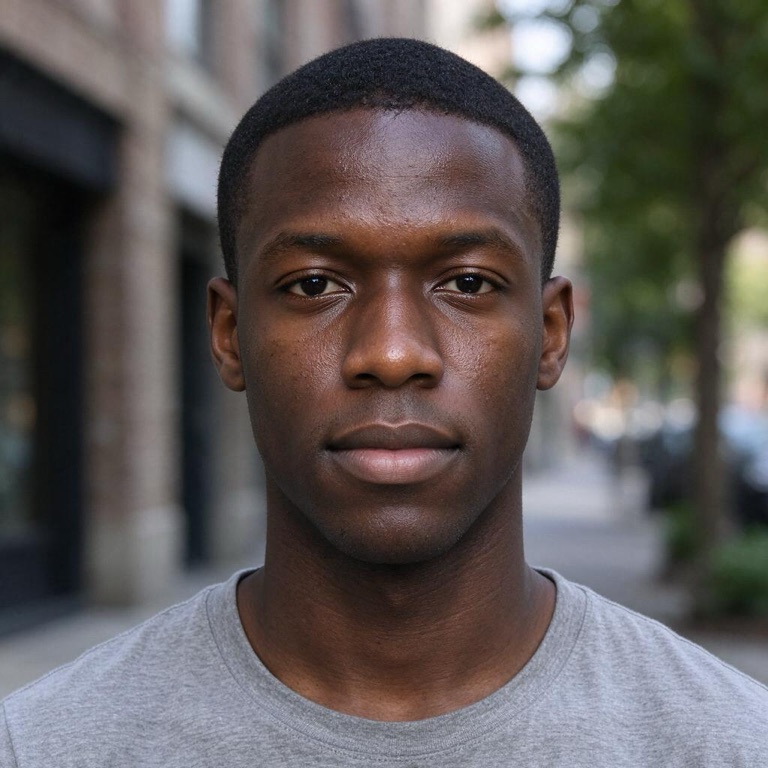 BeforeAfter
How to use the gender swap filter
- Upload a photo of yourself. A clear, front-facing photo with one face works best. You can also take one with your camera.
- Choose a direction. To female turns a man's photo into the female version of him. To male turns a woman's photo into the male version of her.
- Generate and download. The new photo is ready in about 20 seconds. Drag the slider to compare it with the original, then download it or try the other direction.
What the gender swap filter changes, and what it keeps
This gender swap filter is a small, careful edit of your own photo. It is not a new portrait of a stranger.
What changes
- Face shape. The jawline, chin and brow ridge get softer for To female and a little stronger for To male.
- Facial hair. To female removes beards and stubble and leaves natural skin. To male adds light, natural stubble.
- Hair. To female gives you shoulder-length hair. To male gives you a short haircut. Your hair colour and texture stay the same.
- Neck. The Adam's apple is removed or added.
What stays the same
- Your eyes, nose, ears and smile.
- Your skin: tone, freckles, moles, lines and texture. There is no smoothing and no added makeup.
- Your age, expression and head angle.
- Your clothes, glasses, background and lighting.
Because so much stays the same, friends usually recognise you straight away. That is the point: you see yourself, not a random face.
Best photos for a gender swap
The gender swap filter can only keep what it can see. These tips give the most natural result:
- One face, looking at the camera. Group photos are refused, and side profiles lose detail.
- Even light. Daylight from a window is ideal. Strong shadows can turn into odd shapes.
- Nothing covering the face. Hands, masks, hats and heavy filters hide the features the AI needs to keep.
- Your hairline visible. It helps the new hairstyle look like it really grows from your head.
- A normal photo, not an edited one. Beauty filters and face-slimming apps confuse the result.
What to expect from different photos:
| Photo | Typical result |
|---|---|
| Clear selfie in daylight | Natural and easy to recognise |
| Older photo or low light | Works, but finer details may soften |
| Sunglasses, heavy shadow or a tilted head | Often looks less like you; try another photo |
Gender swap for trans and nonbinary self-exploration
Many people use a gender swap filter for more than a laugh. If you are trans, nonbinary or questioning, seeing a realistic version of your own face can be a quiet, private way to explore how you feel about it.
We built this filter to be respectful of that. It keeps your real features instead of turning you into a stock model, and it never makes the result sexual. Your photos are not shared or shown anywhere. You can delete a result from your account at any time.
A filter is only a picture. It can't tell you who you are, and it can't predict what hormones or surgery would do. If you want to talk to people who have been through the same questions, communities such as r/asktransgender and local LGBTQ+ centres are good places to start.
Gender swap filter vs Snapchat lenses
Snapchat and TikTok have live gender swap lenses. They are fun for a video, but they work differently.
| GirlFilter gender swap | Live app lens | |
|---|---|---|
| Input | One still photo | Your live camera |
| Look | Photo-realistic, keeps your skin | Smooth, cartoon-like |
| Result | A downloadable image | A recording or a snap |
| Account | Google sign-in | The app account |
If you want a still photo that you can save, compare side by side, or show a friend, a photo-based gender swap filter gives a cleaner result. If you want to pull faces in real time, a live lens is the better tool.
Privacy and safety
- Your upload is deleted as soon as your image is done. We don't keep it in our database or use it to train AI models.
- Results stay in your account for 30 days, and you can delete them at any time.
- Adults only. Photos must be of you or of an adult who agreed to it. Illustrations must be your own original character, not one from an existing franchise. Photos of children are blocked, and so are illustrated characters who are clearly young children. Art styles such as chibi are fine; nude or sexual artwork is always refused.
- No sexual content. Nude or sexual photos and artwork are rejected.
- A visual preview, not a prediction. Results show one possible look, made by AI.
Gender swap filter FAQ
Is the gender swap filter free?
When you sign in with Google you get 4 free credits, which make 2 images. Each image uses 2 credits, whichever direction you choose. Free accounts can make up to 2 images per day. Until you buy a pack, results show a small girlfilter.com mark in one corner. See pricing for credit packs.
Can I swap from female to male?
Yes. Choose To male before you press Generate. The same filter works in both directions.
Why doesn't the result look like me?
Usually the photo is the cause: low light, a turned head, sunglasses or a beauty filter. Try a clear front-facing photo. If a generation fails, your credits are returned automatically.
Does it work on group photos?
No. The filter needs exactly one face. Crop the photo to one person first.
Can I use a photo of a friend?
Only with their permission, and only if they are 18 or over. Photos of children are blocked.
What happens to my photo?
The photo you upload is deleted when your image is done. The result stays in your account for 30 days so you can download it again, and you can delete it sooner. Read our privacy policy for details.
Is this the same as the girl filter?
Our girl filter only goes from male to female and offers two strengths, Natural and Feminine. This page lets you go in either direction.
More filters
Try the gender swap filter now: upload a photo and see your opposite gender in about 20 seconds.