Boy Filter: See the Male Version of You
Our AI boy filter turns one photo of you into a photo of an adult man who is still clearly you. Pick a photo, give it about 20 seconds, then slide between the original and the new version. The boy filter keeps your current age, so the result is the man you might look like today.
No login needed · 2 free images · about 20 seconds
You can also paste an image with Ctrl/⌘+V.
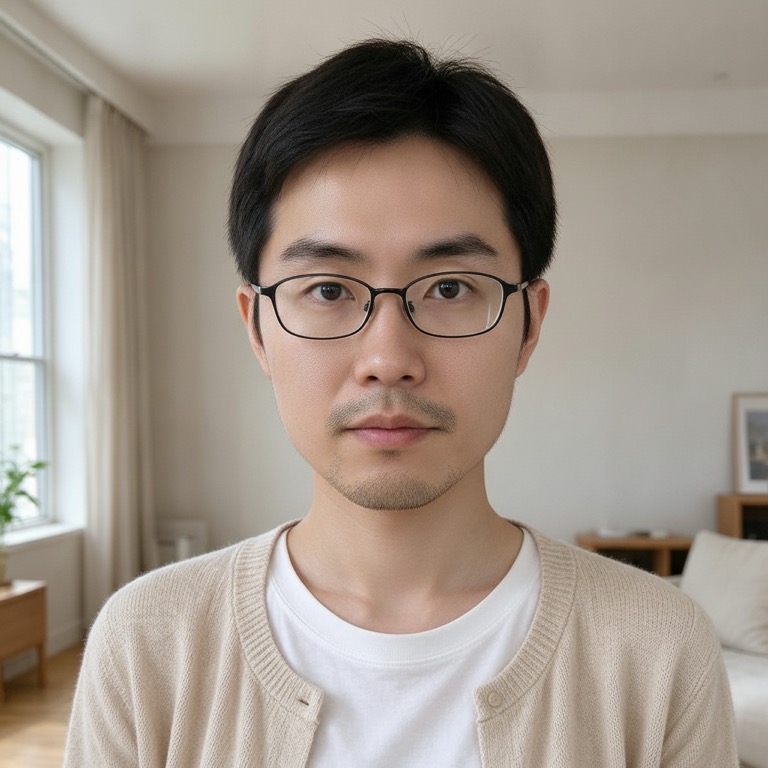
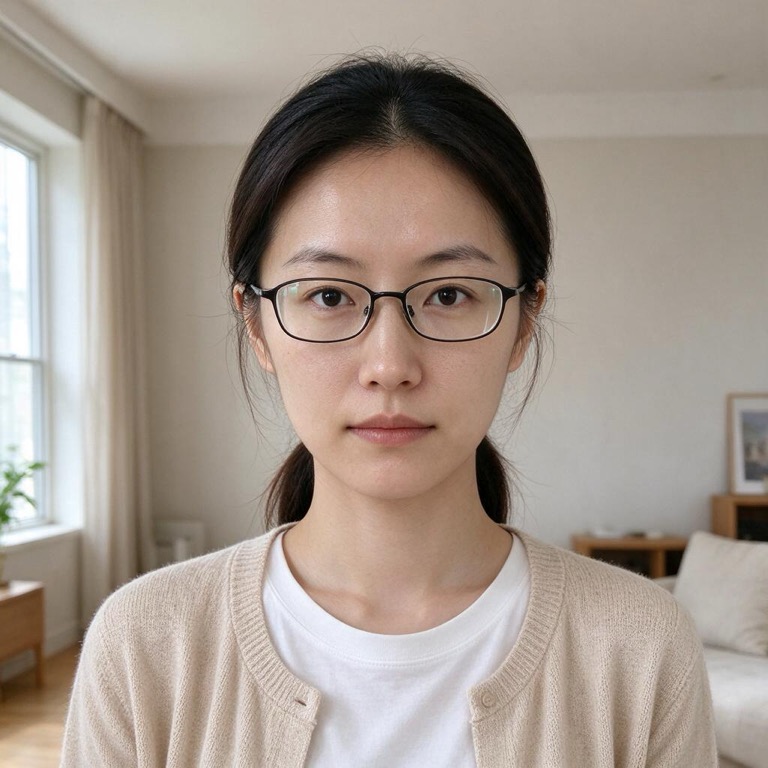 BeforeAfter
How to use the boy filter
- Upload one clear photo. One face, looking at the camera, in good light. Your webcam or phone camera works too.
- Press Generate. The boy filter has a single look, so there is nothing to pick. It costs 2 credits per image.
- Compare and download. The result is ready in about 20 seconds. Drag the slider to see before and after, then download it in full quality with any credit pack.
What would I look like as a boy?
Plenty of people type that question into a search box when they are curious, and the boy filter answers it with a real photo of you instead of a cartoon. Here "boy" is how people say "the male version of me". The result is a grown man at the same age as the person in your photo. If you are 27, the man in the result looks about 27.
What the boy filter changes
- Jaw and brow. The jawline, chin and brow ridge become a little stronger and more angular.
- Eyebrows. They get a bit thicker and straighter.
- Hair. Long hair is cut into a short, masculine style. Your hair colour and natural texture stay the same.
- Facial hair. Light, natural stubble appears on the lower face.
- Makeup. Any makeup in the photo is removed.
What stays the same
- Your eye shape and colour, nose, ears and overall face proportions.
- Your skin: tone, freckles, pores and lines are left alone, with no smoothing or whitening.
- Your age, expression and head pose.
- Your clothes, glasses, jewellery, background and the light in the photo.
See the boy version of me
A good boy version of me should still look like me. That is why the boy filter changes only the cues that read as male and keeps the rest of the photo as it was. Most people recognise themselves right away, which is the whole point of seeing the boy version of yourself instead of a random stranger.
Because the edit is small and realistic, results depend a lot on the photo you start with. A clear, front-facing picture usually gives a natural result. A tiny face in a busy photo gives the boy filter less to work with.
If you want to look at the same photo from a different angle, our girl filter goes the other way, and the female filter does the same male-to-female effect on its own page.
Boy filter and beards: what you actually get
Many people search for a beard filter at the same time. The boy filter is not a beard tool, so here is what to expect.
- The result usually shows light stubble or a short, trimmed beard. In our own tests, one photo came out with stubble and another with a short beard.
- You cannot choose the length or the style. There is no setting for a goatee, a moustache or a particular cut.
- It cannot make a thick, full beard. If you were hoping for a long beard, the boy filter will not deliver one.
If light stubble and a short beard are what you wanted to see, the boy filter does that well. If you need a specific beard style, a dedicated beard editor is a better fit.
Which photos work best
There are no dials to turn here, so the photo you choose decides almost everything.
- Face the camera. A head-and-shoulders shot shows the whole face at a useful size.
- Use daylight. Window light keeps skin looking like skin, and the edit builds on that.
- Keep your face clear. A mask, dark lenses or a fringe across the eyes leave the model guessing.
- Expect a haircut. Long hair is removed completely, so a ponytail or curls turn into a short cut.
- Skip beauty apps. A photo that was already airbrushed stays airbrushed.
- Use a photo of an adult. Everything here is built for people aged 18 and over.
Ways people use the boy filter
- Curiosity. Many people want to see a male version of themselves, built from a real photo.
- A laugh with friends. Post your before and after in the group chat and let everyone vote on the best match.
- Characters and stories. Writers and role-players use the boy filter to picture a male version of a character they play.
- Quiet curiosity. Some people just want a private look at how the male version feels, and that is fine by us.
This is an image effect for fun and curiosity. It says nothing about who you are and does not forecast any real change. Upload only your own picture, or one from a person who agreed.
Want to try other looks on the same picture? The age filter adds years and the bald filter removes the hair.
What happens to your photo
Your browser first resizes the picture and strips EXIF and location data. A screening step then turns away photos of minors and anything with nudity. Only after that does our AI provider, reached through kie.ai, create your image.
We remove the original as soon as the job finishes. Your result sits in your account for 30 days, private to you, unless you delete it earlier. Every provider and the data it gets are listed in the privacy policy.
Boy filter pricing
No login needed — 2 free images per browser. One boy filter image costs 2 credits, which makes two free images. Free results are preview quality. Buy any credit pack to download every image you've made in full quality (1024×1024). More credits come as one-time packs with no auto-renewal, listed on the pricing page. A failed generation is refunded automatically.
Privacy and safety
- Your upload is deleted as soon as your image is done. We don't keep it in our database or use it to train AI models.
- Results stay in your account for 30 days, and you can delete them at any time.
- Adults only. Photos must be of you or of an adult who agreed to it. Illustrations must be your own original character, not one from an existing franchise. Photos of children are blocked, and so are illustrated characters who are clearly young children. Art styles such as chibi are fine; nude or sexual artwork is always refused.
- No sexual content. Nude or sexual photos and artwork are rejected.
- A visual preview, not a prediction. Results show one possible look, made by AI.
Boy filter FAQ
Will the boy filter make me look like a kid?
No. The result keeps your apparent age, so a photo of a 30-year-old gives a man who looks about 30. The boy filter is for adults and keeps your age exactly as it is.
Is there a male filter for girls with long hair?
Yes, this male filter is made for exactly that photo. Long hair is cut to a short, masculine style in the same colour, and the rest of your face is kept. Hair that falls over your eyes can hide detail, so pull it back for the best result.
Can it add a full beard?
No. You will usually see light stubble or a short beard, and you cannot choose which. It does not draw a thick, long beard.
Does it keep my glasses and earrings?
Glasses are kept, as are other accessories and jewellery that are clearly visible. Small items can be hard to see, so check the result before you share it.
What happens to my photo?
It is used only to produce your image and is deleted when the job ends. Results are kept for 30 days in your account unless you remove them sooner. The privacy policy has the details.
More filters
Try the boy filter now: upload a photo and see the male version of you in about 20 seconds.